Contributing and deployment
Local setup
git clone https://github.com/nocturnaljojo/energy-operations-research.git
cd energy-operations-research
uv sync                       # Python 3.12 env with dev + docs groups
uv run pytest                 # mathematical tests
uv run mkdocs serve           # live preview at http://127.0.0.1:8000
| Task | Command |
|---|---|
| Lint / format | uv run ruff check . && uv run ruff format . |
| Types | uv run mypy |
| Regenerate figures | uv run python scripts/build_figures.py |
| Regenerate notebook 1 | uv run python scripts/make_notebook_01.py |
| Execute notebooks | uv run python scripts/run_notebooks.py |
| Render an animation | uv run --group anim manim -qm animations/foundations/feasible_region.py SharedConnectionLP |
Manim needs Cairo, Pango and FFmpeg system libraries
(apt install libcairo2-dev libpango1.0-dev ffmpeg pkg-config on Debian/Ubuntu). No
LaTeX is required: scenes use Pango text.
Hosting: Cloudflare Pages
The book is a static site built by MkDocs and served from Cloudflare Pages. The
docs GitHub Actions workflow builds the site and uploads it with Wrangler:
| Event | Result |
|---|---|
Push to main |
Production deploy at https://energy-operations-research.pages.dev |
| Pull request | Preview deploy at https://<branch>.energy-operations-research.pages.dev |
| Secrets missing (e.g. a fork) | Site is built and link-checked, not deployed |
One-time setup
You do this once per repository. The token keeps working until you revoke it; redo the steps only if you rotate the token, move the book to another repository, or add a deploy target that needs other permissions (for example R2 storage for the data layers).
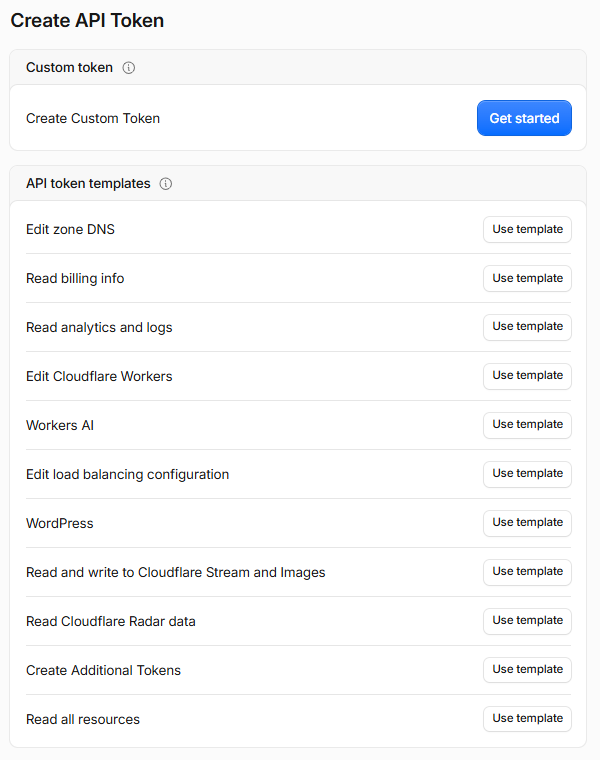
1 · Create an API token. In the Cloudflare dashboard, click the person icon (top right) → Profile → API Tokens → Create Token. Use Create Custom Token → Get started, not one of the templates: none of them grants Pages access alone.
2 · Give it one permission. Fill in the form:
| Field | Value |
|---|---|
| Token name | energy-or-pages-deploy (any name) |
| Permissions | Account → Cloudflare Pages → Edit (the third box is easy to miss) |
| Account Resources | Include → your account |
| Client IP Address Filtering | leave empty (GitHub's runners have no fixed IP) |
| TTL | leave empty, or the deploy stops when the token expires |
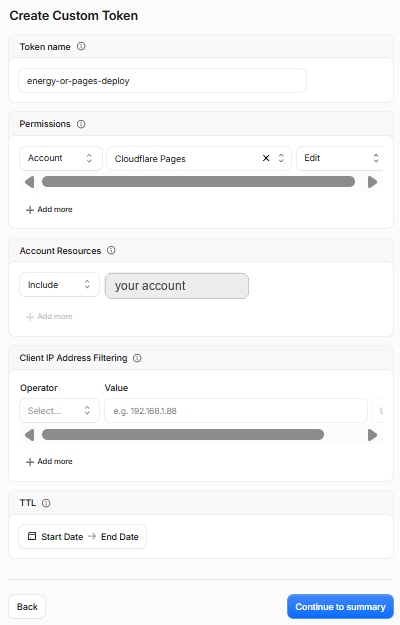
Click Continue to summary → Create Token and copy the token at once: Cloudflare shows it only once. Paste it only into GitHub (step 4), never into chat, code or a commit.
3 · Find your Account ID. It is the 32-character hex string in the dashboard
address bar (dash.cloudflare.com/<account-id>/home), also under Account home → ⋯ →
Copy account ID. It is an identifier, not a secret, but keep it in a secret anyway
so it stays out of workflow logs.
4 · Add both to GitHub. In the repository, open Settings → Secrets and variables → Actions → New repository secret and add:
CLOUDFLARE_API_TOKENCLOUDFLARE_ACCOUNT_ID
5 · Optional settings. Add the repository variable CLOUDFLARE_PAGES_PROJECT to
use a project name other than energy-operations-research. To use a custom domain,
attach it under Workers & Pages → your project → Custom domains, then update
site_url in mkdocs.yml.
6 · Deploy. Push to main (or open a pull request for a preview). The workflow
creates the Pages project on its first run and deploys. Check the run under the
repository's Actions tab: a missing secret shows as the notice
CLOUDFLARE_API_TOKEN not set; skipping deploy.
Screenshots taken October 2026; Cloudflare redesigns its dashboard often, so trust the field names above over the pictures.
docs/_headers sets security and cache headers; Cloudflare Pages applies it
automatically.
Why Cloudflare
The book is static, so any CDN would do. Cloudflare also has services the later production chapters need: R2 object storage for the raw / bronze / silver / gold data layers, Workers and Cron Triggers for lightweight scheduled jobs, and Containers for running Python optimisation services. Those are introduced only when a chapter needs them.
Chapter checklist
A chapter is done only when it is:
- Readable: follows the 15-step template, intuition before mathematics
- Executable: has a Colab notebook that runs top to bottom in CI
- Visual: at least one figure generated from solver output; an animation where it explains something
- Tested: hand-derivable optima and physical limits asserted in
tests/ - Reproducible: seeded randomness, documented data provenance, synthetic data labelled
- Defensible: units explicit; approximations of AEMO processes stated as such
- Connected: links forward and back to the rest of the book